DJI Tello – An Experience
0
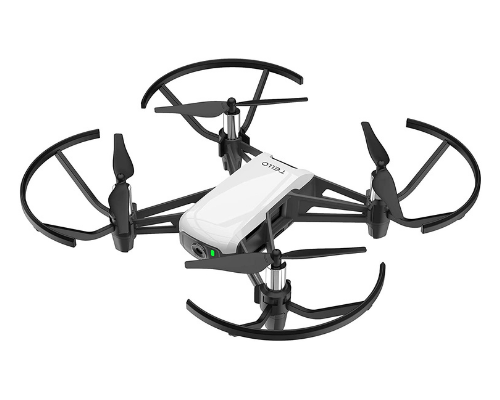
The DJI Tello drone is not only a drone but a tool to learn many coding languages. In this hands-on DJI Tello review, we cover real-world flight performance, camera quality, battery life, and the programming features that make the Ryze Tello one of the best beginner drones and STEM drones you can buy today.
When most people search for a cheap drone with camera, they expect a fragile toy. The DJI Tello is different. Built with help from DJI and Intel, this compact quadcopter delivers stable flight, a usable 720p camera, and a serious educational angle through the Tello SDK. Whether you want casual flying or a programmable drone for learning code, the Tello punches above its price.
First Impressions: Small DJI Tello, Surprisingly Polished
Out of the box, the DJI Tello drone feels like a premium tech gadget rather than a disposable toy. Prop guards are included, setup takes minutes, and the free Tello app walks you through connection and your first takeoff.
Charge the battery, connect your phone to the Tello Wi‑Fi network, and you are ready to fly. No expensive remote is required, though the GameSir T1d controller is a popular upgrade for smoother manual flying.
DJI Tello Setup and App Experience
Getting started with the DJI Tello drone is one of the easiest setups in the consumer drone market. Download the official app, power on the drone, join its Wi‑Fi network, and calibrate if prompted. Within minutes, most users can complete a successful first flight.
The app interface is clean and beginner-friendly. You get a live video feed, battery status, signal strength, and quick access to intelligent flight modes. For families and classrooms, that simplicity matters—you spend less time troubleshooting and more time flying or coding.
Flying the DJI Tello: Stable and Beginner-Friendly
In the air, Intel vision positioning helps the DJI Tello hold steady indoors—where most owners fly first. Hovering is stable, takeoff and landing are predictable, and basic tricks feel responsive once you learn the on-screen controls.
Real-world specs that matter in daily use:
- Flight time: about 13 minutes per battery
- Range: roughly 100 meters in open areas
- Weight: light enough for indoor rooms and backyards
- Top speed: around 8 m/s in fast mode
The app includes fun modes such as Throw & Go, 8D Flips, Bounce Mode, and 360 rotation. These modes are entertaining, but they also help new pilots build confidence before switching to full manual control.
DJI Tello Camera: Good for Learning, Not for Pro Video
The DJI Tello camera shoots 720p video and 5 MP photos. That will not compete with a DJI Mavic, and low-light footage can look soft. For a budget mini drone with camera, though, it is fair.
The live FPV feed in the app is responsive enough for indoor navigation, and the camera is useful for learning basic aerial framing. If your goal is a coding drone or STEM project—not cinematic filmmaking—the Tello camera is adequate.
Where the DJI Tello Shines: Coding and STEM Education
This is the feature that separates the DJI Tello from ordinary toy drones. It is one of the most accessible programmable drones on the market, which is why schools, coding camps, and hobbyists recommend it for STEM learning.
Scratch Programming with DJI Tello
Using MIT Scratch, beginners drag blocks to command takeoff, flips, and flight paths. It turns abstract coding concepts into visible movement—a perfect introduction to robotics for kids and first-time coders.
Python and the Tello SDK
For older students and makers, the Tello SDK supports Python control on Windows, macOS, and Linux. You can automate missions, read telemetry, and integrate the drone with projects on a Raspberry Pi or laptop. If you are learning Python, the Tello becomes a flying robot you control from real code.
Swift Playgrounds on iPad
Apple’s Swift Playgrounds integration makes the DJI Tello drone a strong choice for classrooms already invested in iPads. Students learn Swift while watching the drone respond to their programs in real time.
Practical Tips for DJI Tello Owners
- Buy at least one spare battery for longer sessions.
- Keep spare propellers—crashes happen while learning.
- Fly indoors or in calm outdoor conditions; wind affects light drones quickly.
- Stay connected to the Tello Wi‑Fi network while flying to avoid disconnects.
- Install firmware updates through the app for better stability.
Who Should Buy the DJI Tello Drone?
Great for: first-time drone pilots, parents introducing kids to STEM, students learning Scratch or Python, and makers who want an affordable programmable drone.
Skip it if: you need 4K video, long-range outdoor flying, or professional aerial photography.
DJI Tello vs Other Beginner Drones
Compared with generic toy quadcopters, the DJI Tello offers better stability, safer design, and official SDK support. Compared with premium DJI models like the Mini series, it costs far less but sacrifices camera quality, range, and flight time.
If your priority is drone programming for beginners, the Tello remains a standout choice. Competing budget drones rarely offer Scratch, Python, and Swift support in one affordable package. That makes the Ryze Tello especially popular in STEM education and maker communities.
Tips for Your First DJI Tello Flight
Fly indoors or in a calm outdoor area with plenty of open space. Keep the drone within line of sight, avoid flying near people or pets, and land before the battery gets too low. If you plan to use the Tello SDK, start with simple commands—takeoff, hover, land—before attempting complex autonomous routes.
DJI Tello Review Verdict
The DJI Tello is not trying to replace DJI’s Mavic lineup—and that is its strength. It is a smart, affordable, code-friendly drone that delivers stable flight, simple controls, and a genuine path into programming.
Fly it manually on day one, then write your first script to make it take off by itself. That moment alone makes the DJI Tello drone one of the best value picks for tech learners in 2026.
Rating: 4/5 — Excellent for education and casual flying; limited by battery life and 720p camera quality.
Related Product(s)
Leave a Reply